It’s hard to deny tablets are fun and ever since the original iPad was so successfully released and a whole market evolved around tablet computers, it is pretty safe to say they are here to stay. With that in mind, it is interesting to see new ways tablets can be used. One of the most notable roles for this new class of personal computer is as a toy for toddlers. It is amazing how well an iPad, inviting to be picked up and touched, fits into the world of a child, even one that is just two and a half years old:
Continue reading
Simplicity, or why Japan kicks Dutch rail’s ass

One of the most awesome things I experienced during my study tour through Japan in 2008 was taking the train. Although the shiny Shinkansen “bullet trains” are certainly not cheap, they easily compete with domestic flights in terms of price, speed, comfort and reliability (97% of trains are within 5 minutes of schedule). Being Dutch, I of course like to complain about the reliability of our own national railways. Me and my friends joked a lot about how Dutch trains would surely be more punctual if train drivers felt obligated to commit Seppuku if they were late. As it turns out, Japan’s impeccable record for railway performance can not be dismissed as the result of some uniquely Japanese cultural values. In a report from a task-force of ProRail (the Dutch railway infrastructure organisation), they find that the efficiency of the Japanese railways can be explained much more easily by a different Japanese value: simplicity.
Continue reading
Waarom ik niet nominaal gestudeerd heb
Ik begon dit stuk als een inzending voor de verhalen pagina van de actie “minimaal nominaal”, maar aangezien ik deze ervaringen nooit eerder op papier heb gezet, besloot ik het ook hier te posten.
Toen ik mijn studie begon, dacht ik: ik ben hier vijf jaar en dan zoek ik zo snel mogelijk een echte baan. Wat een slecht idee was dat. Continue reading
Piracy and Germany’s Industrial Expansion
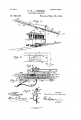
Since I am currently doing an internship at Siemens Corporate Research, I thought it would be interesting to learn more about the largest European engineering conglomerate [1]. Founded by Werner von Siemens in 1847, Siemens is a product of the Second Industrial Revolution; a prosperous time for Germany. According to an article in Der Spiegel titled “No Copyright, The Real Reason for Germany’s Industrial Expansion?”, it may just have been Germany’s relaxed copyright laws that allowed the country to fare so well during these times of technological and economic progress.
The article outlines the argument made by economic historian Eckhard Höffner. He states that the absence of strictly enforced copyright laws was of great influence on the disseminiation of scientific knowledge. Whereas in comparable countries such as England, the publication of academic research and technological inventions was controlled by an elite clique, German scientists were able to reach a wide audience due to their works being copied, pirated and spread.
The prospect of a wide readership motivated scientists in particular to publish the results of their research. In Höffner’s analysis, “a completely new form of imparting knowledge established itself.”
Essentially the only method for disseminating new knowledge that people of that period had known was verbal instruction from a master or scholar at a university. Now, suddenly, a multitude of high-level treatises circulated throughout the country.
While this is obviously not a wholistic explanation for the explosion of scientific and technological progress in 19th century Germany, it offers an interesting perspective on the role of copyright in a time where this topic is hotter than ever. Were 19th century German scientists and inventors poor gullible bastards that got their works stolen from them by the masses? It doesn’t look like it.
Sigismund Hermbstädt […] a chemistry and pharmacy professor in Berlin, who has long since disappeared into the oblivion of history, earned more royalties for his “Principles of Leather Tanning” published in 1806 than British author Mary Shelley did for her horror novel “Frankenstein,” which is still famous today.
Now only if someone pirated Eckhard’s own book “Geschichte und Wesen des Urheberrechts” so I don’t have to import it from Germany for an insane price, we could put his theories to the test ;)
Re: Let me see your papers, let me see your source
I came across a really interesting post by Chris Lewis, titled Let me see your papers, let me see your source, and what started as a reply on his blog, turned into a story I felt was worth a blog post of its own. Here goes:
Message to iPhone devs: pixels are not space
One of the most significant improvements of the recently introduced iPhone 4 over its predecessors is the so called Retina Display. Apple has significantly bumped up the resolution of their pocket-sized cash cow from 320×480 to 960×640 pixels. In all fairness, the two year old screen of the iPhone 3G was starting to look coarse in comparison to the competition, but with a dot pitch of 326 ppi, that new screen is sharp. More pixels doesn’t mean more space though.
Continue reading
Outliers
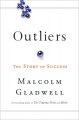
Quite a while ago, I heard of Malcolm Gladwell’s book Outliers: The Story of Success*. I didn’t pay much attention to it at the time; to me, the title suggested that this would probably be some kind of self-help book of the kind that has supposedly already “changed the lives of millions”. I couldn’t have been more wrong.
Continue reading
A new micheljansen.org
Almost five years ago, I decided it was time to create myself a place to vent my thoughts. I installed WordPress on my home server and started writing; “Michel’s Exhaust” was born. Quickly after that I registered my own domain “micheljansen.org” and moved my site off-campus. I still used a vanilla WordPress install, with a free theme called Rin. It was clean, it was beautiful, but eventually everything gets old. It was time for something new.
Continue reading
Augmented Reality against Aggression
Augmented Reality is a term these days most often associated with people running around perceiving the world through the screens of their mobile phones. That’s not the case in this Dutch campaign against aggression towards public workers though.
Continue reading
Twente Milieu Afval-iCalender

Forgot to put out the trash again? Twente Milieu collects recycled paper, plastic and biomass once a month, which often leaves the less organised among us with heaps of stuff piling up. To scratch my own itch, I’ve made a simple afval iCalender webapp that scrapes the website of Twente Milieu and turns it into an iCalendar feed to subscribe your iCal, Google Calendar and mobile phones to.
Continue reading